With the release of Wrapper version 3.3.7,
the Wrapper provides the ability to change some of its resources
and to customize its appearance on Windows.
When customizing the consoleless version of the Wrapper binary
"wrapper.exe",
consoleless version "wrapperW.exe",
a new version of the binary (Example.: MyApp.exe) will be created
with the new resources specified with the "--customize" command.
The resulting binary will be locked,
meaning that it is no longer possible to customize it.
When creating a new customer binary, any of the following arguments can be combined.
The "--target {target.exe}" argument is always required.
Please note that the paths of all file names are relative to
the location of the Wrapper binary,
not necessarily relative to the location of the caller.
For example, the following command will create the target file in the same directory
as the "wrapperW.exe" binary
and expect to find the new icon and splashscreen in that directory as well:
Since Wrapper version 3.5.7, the Windows binaries of the Wrapper will be codesigned in order to verify the binary is originated from us.
However, please note that customizing the binary will strip the certificate from the binary.
The Target Executable
When the Wrapper binary is customized,
it is necessary to always specify a new file name for the customized version.
The Wrapper will always overwrite the file if it already exists.
wrapperw.exe --customize --target myapp.exe
Putting the parameter all together would result to a
command line like this:
The Wrapper is shipped with a default icon,
however the Wrapper has proven to be also an excellent Application launcher,
for this purpose a software developer may wish to replace the Icon
with that of the product the Wrapper is being used with.
The icon file is a standard multi layer icon file that
contains all of the resolution and icon sizes that need to be supported.
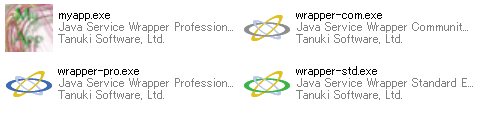
The following is a screenshot of a directory containing a customized MyApp.exe along with
renamed copies of the three Java Service Wrapper Editions and their default icons.
The consoleless version of the Wrapper binary, "wrapperW.exe",
by default will show a Splash Screen on startup.
This splash screen can be customized with an image representing
the product that the Wrapper is being used with.
The Wrapper binary wrapper.exe doesn't display a splash screen,
therefore, the argument for customizing the splash screen is illegal.
Having the Wrapper display a splash screen rather than doing so from within Java
has the benefit of making the applications startup seem very responsive
because the splash screen will be displayed before the JVM is launched
and can remain visible as the Java application's classes are loaded and initialized.
Currently only bitmap (*.bmp) files are supported.
There are no size or bit-depth restrictions set.
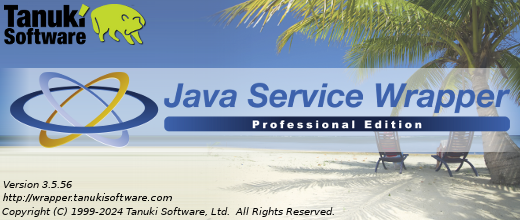
Default Java Service Wrapper Professional Edition splash screen.
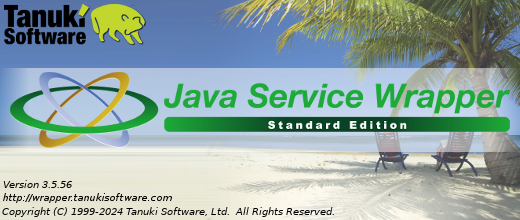
Default Java Service Wrapper Standard Edition splash screen.
Example custom splash screen.
Customize the default Configuration File
By default, if the Wrapper binary gets called without specifying any configuration file,
the Wrapper will assume to use the default configuration file in the same directory where the exectuable is located.
It is a file called {MyApp}.conf,
whereas the name {MyApp} is based on the file name of the exectuable file.
For instance: if the exectuable file is called "test.exe",
the Wrapper will try to open "test.conf".
By default, the Wrapper interprets parameter by itself.
Any parameter which should be passed over to the JVM application had to be defined with the
wrapper.app.parameter.<n> property.
In Wrapper version 3.5.2, the "--" command was added to ease passing over to the JVM application,
however customizing your application with this new option will actually put the Wrapper in background
and make the executable look and feel like a sovereign Windows Application
- quite like a native Windows Application.
Activating this functionality just requires you to add the "--passthrough" parameter
in the command to customize your Wrapper executable,
and the new executable will start your Java application right out-of-the-box.
Because the Wrapper will pass over all parameters to the JVM,
it is not possible to specify the configuration file through the command line anymore.
The new executable will rather try to use the default configuration file.
In order to change the default configuration file,
please consider using the "--conf" option described above.
The whole command line will be passed over to the JVM,
making the Wrapper itself deaf to any input from the command line.
This will also take the ability to use the customized executable for installing the application as Windows Service etc.
The Wrapper binary has a version info resource defined, which sets the basic
file information, like Version number, Copyright, File Description, Manufacturer etc..
Distributers, who are bundling their application with the Wrapper and want to put their
own Company information in front of the Wrapper binary, might want to replace
the Manufacturer Name of the binary from
"Tanuki Software, Ltd." to their company name.
Example:
wrapperw.exe --customize --target myapp.exe --manufacturer "My Example Company"