Technische Tipps |
||||||||||||||||||
|
Wir haben eine Reihe von Fragen-und-Antworten-Abschnitte erstellt, um bestehenden und neuen Benutzern zu helfen, von allen Features, die der Wrapper anbietet, Nutzen zu ziehen. Ein Newsletter wird unseren Nutzern gesendet, um sie über die neuesten technischen Tipps für den Java Service Wrapper zu informieren.
|
 Es ist möglich, den Java Service Wrapper als ein externes Tool auszuführen, um Ihre Anwendung, von
 Java als eine Sprache wurde mit dem Ziel entwickelt, es für von Benutzer entwickelten Code unmöglich zu machen, einen Anwendungsabsturz zu verursachen.
Jeder Fehler würde in einen Ausnahmefehler resultieren, dessen Ausgabe gleichzeitig abgefangen und dann auf geeignete Weise erledigt würde.
Java als eine Sprache wurde mit dem Ziel entwickelt, es für von Benutzer entwickelten Code unmöglich zu machen, einen Anwendungsabsturz zu verursachen.
Jeder Fehler würde in einen Ausnahmefehler resultieren, dessen Ausgabe gleichzeitig abgefangen und dann auf geeignete Weise erledigt würde.
 Wenn User zum ersten Mal den Wrapper einsetzen, sind sie gewöhnlich daran interessiert, wie sich ihre Anwendung mit dem Wrapper integrieren lässt, um als ein Dienst zu laufen oder um ihre Anwendung überwachen zu lassen.
Sobald eine Anwendung installiert und mit anderen Systemen integriert ist, kommt jedoch häufig die Frage auf, wie man diese beenden kann.
Wenn User zum ersten Mal den Wrapper einsetzen, sind sie gewöhnlich daran interessiert, wie sich ihre Anwendung mit dem Wrapper integrieren lässt, um als ein Dienst zu laufen oder um ihre Anwendung überwachen zu lassen.
Sobald eine Anwendung installiert und mit anderen Systemen integriert ist, kommt jedoch häufig die Frage auf, wie man diese beenden kann.

 Wenn ein für das Unternehmen kritische Programm beginnt, zu hängen, kann eine alptraumhafte Situation für
einen Systemadministrator, Entwicklerteam und für jeden, der das System benutzt, entstehen.
Problemidentifikation und -lösung kann in manchen Fällen Tage oder gar Monate dauern.
In der Zwischenzeit wird das System aktiv benutzt und muss im Betrieb bleiben.
Wenn ein für das Unternehmen kritische Programm beginnt, zu hängen, kann eine alptraumhafte Situation für
einen Systemadministrator, Entwicklerteam und für jeden, der das System benutzt, entstehen.
Problemidentifikation und -lösung kann in manchen Fällen Tage oder gar Monate dauern.
In der Zwischenzeit wird das System aktiv benutzt und muss im Betrieb bleiben.
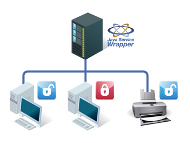 In Windows-Umgebungen ist es für Benutzer üblich, Netzwerklaufwerke und Drucker freizugeben, so dass sie von ihrem lokalen System darauf zugreifen können.
Windows Dienste haben oft die gleichen Anforderungen, aber Windows macht es sehr schwierig für Dienste,
Zugang auf diese Freigaben zu bekommen, wenn der Dienst bereits beim Systemstart gestartet wurde.
Oft haben Dienste Zugang zu Freigaben, wenn sie in einem laufenden System gestartet werden, aber nach einem Neustart des Systems werden diese Freigaben nicht mehr verfügbar sein.
In Windows-Umgebungen ist es für Benutzer üblich, Netzwerklaufwerke und Drucker freizugeben, so dass sie von ihrem lokalen System darauf zugreifen können.
Windows Dienste haben oft die gleichen Anforderungen, aber Windows macht es sehr schwierig für Dienste,
Zugang auf diese Freigaben zu bekommen, wenn der Dienst bereits beim Systemstart gestartet wurde.
Oft haben Dienste Zugang zu Freigaben, wenn sie in einem laufenden System gestartet werden, aber nach einem Neustart des Systems werden diese Freigaben nicht mehr verfügbar sein.