Cascading Configuration Files |
||||||||||||||||
|
Starting with Wrapper version 3.0.0,
it is possible to specify "include files" within a configuration file like cascading style.
This is useful where there is a need to override default values
without modifying the main default configuration file
"wrapper. Syntax: Include files are specified by placing a line in the configuration file with the following syntax:
Layer Depth: Include files can be nested up to 10 levels deep with cascading style. Property Priority: The order of where within a file you should put the definition of the include file is important. If there are the same name of properties in the configuration files, you should pay attention to the order.
The definition of "#include" line should be placed
at the very bottom of the configuration file.
For example,
the "wrapper. On the other example, properties set after the included file will override properties settings within the included files. This rule applies to the all contents of include files as well. 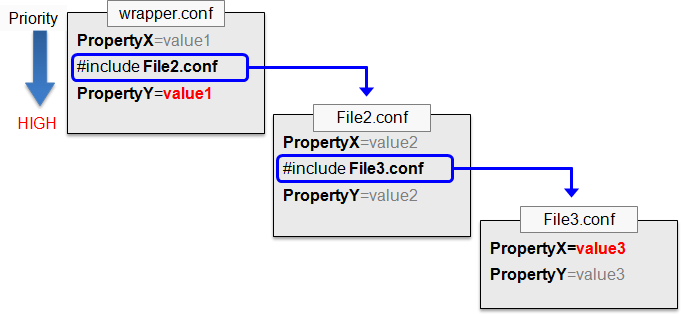
Path:
If relative paths to the include files are specified,
be aware that all paths must be relative to the location of the Wrapper working directory.
By default, the working directory is the location
of the wrapper. Use with Environment Variables: When using include files, it is possible to also reference environment variables. You can either reference the environment variables that are already defined by the Wrapper, or set your own environment variables in the configuration file as needed. The pre-defined environment variables can be found in the Environment Variables page. When the path to the include file containing the variable matches an existing file on your machine, this will allow you to specify in that file a set of configuration properties that you only want to apply for a specific environment. For example, if you want to include platform-specific configurations, you may reference the following #include directive in your main configuration file:
And then create a file for each platform that needs a specific configuration.
|